AI calorie and protein counter
Your body runs on math: Evzia finds your formula
It suggests your calories and protein, counts them for you from a photo or a sentence, and estimates how much you really burn. On your own or in a group.
Android? Coming soon to Google Play. Meanwhile, try it in your browser.
- No ads
- The AI doesn’t train on what you send
- Database in the EU
- Made in Spain
- Free to start
How it works
-
Snap a photo or just say it
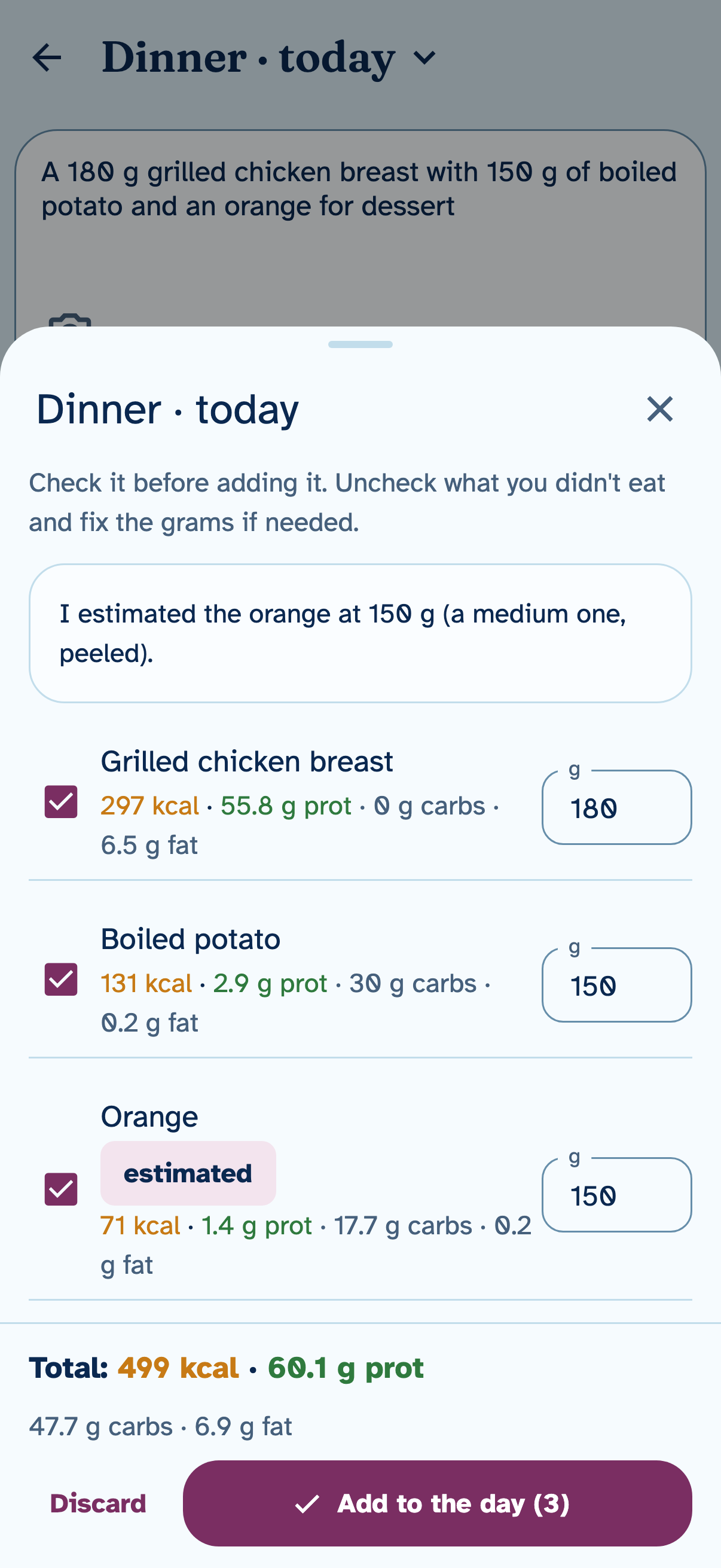
Type or dictate what you ate, or take up to 4 photos of the plate or the label.
-
Evzia calculates, you confirm
It suggests each food with its grams, calories and protein. Nothing counts until you add it.
-
See your day and what you really burn
What you’ve had and what’s left of your calories and protein and, over the days, how much you really burn.
Your formula, not one from a book
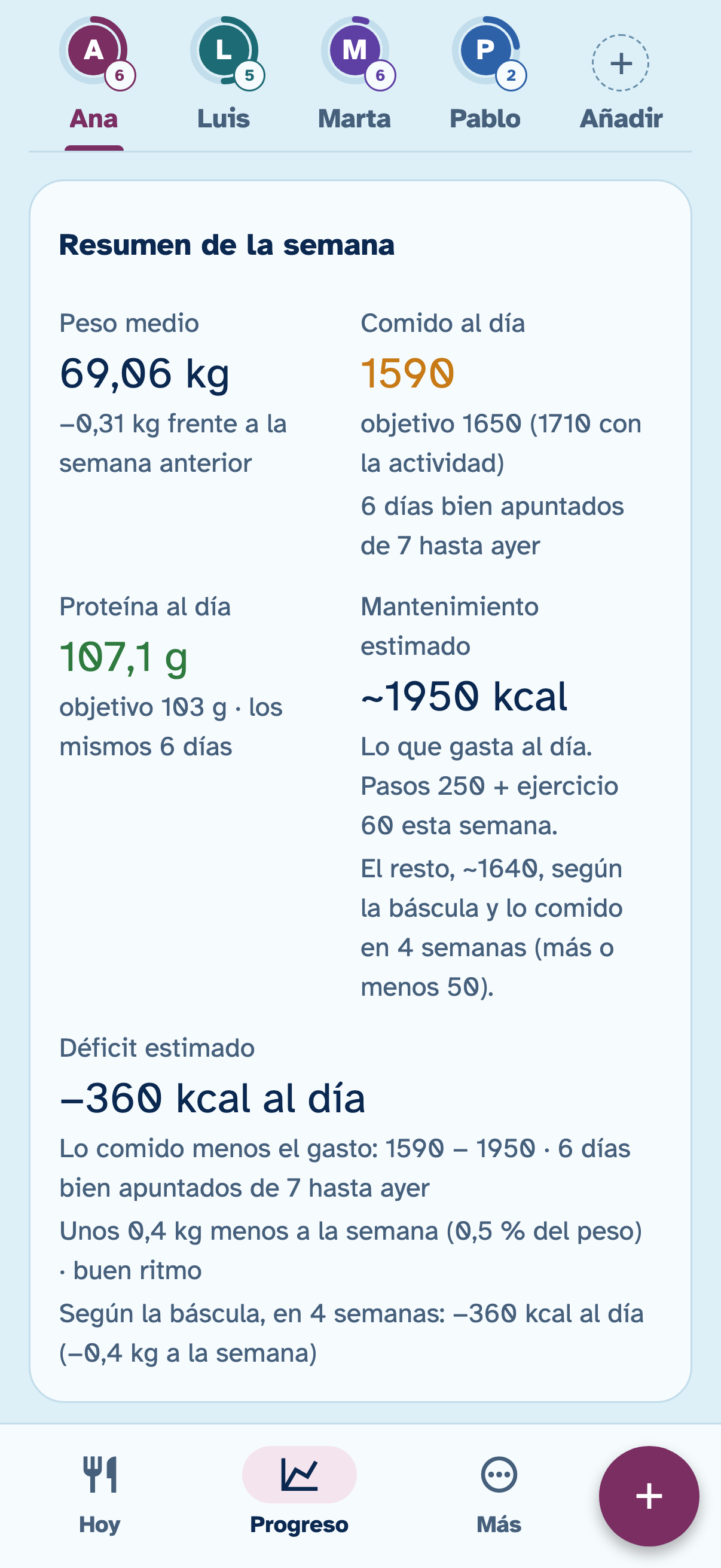
What you eat, what you burn and how your weight changes are tied together by one equation. You log what you eat and weigh yourself; Evzia works out what you really burn.
1,590 kcal you eat a day You log it.
minus 1,950 kcal you burn a day Evzia works it out.
equals −360 kcal difference each day It shows up in your weight.
Your weight trend
- What the scale says each day
- The 7-day average
-
At the start
It suggests your calories and protein with well-known formulas (your resting burn with Mifflin-St Jeor, your steps and your goal) and with limits: never under 1,200 kcal or a deficit of more than 25% of what you burn, and no weight-loss goal for minors, for a BMI of 18.5 or under, or for anyone who burns very little.
-
In a few days
With three well-logged days in the week, it tells you whether you’re in a deficit, at maintenance or in a surplus: what you eat compared with what you burn.
-
After about two weeks
If you log and weigh yourself often, it estimates your maintenance from what you eat and what you weigh.
-
Always
It never changes your goal on its own: it shows you the math and you decide. And when something is an estimate, it says so.
Log without weighing or searching
“150 g of lentils and a banana”
- Type it, dictate it or take up to 4 photos at once: of the plate, the product or the label.
- A cooked dish comes out ingredient by ingredient, each with its grams.
- If you don’t say how much, it estimates and marks it as an estimate.
- If you photograph a label, “Your foods” can keep its values.
- What you save is remembered: next time it shows up instantly, with no AI and no credits spent. And anything you don’t have is in the “Food database” (CIQUAL 2025, from Anses).
- And if you’re unsure, ask: “What should I have for dinner to reach my protein?”
On your own or in a group
Use it on your own or in a group: as a couple, as a family or with friends. Each person has their own goals and everyone sees the same data on their phones, instantly.
- Any phone in the group can log for anyone.
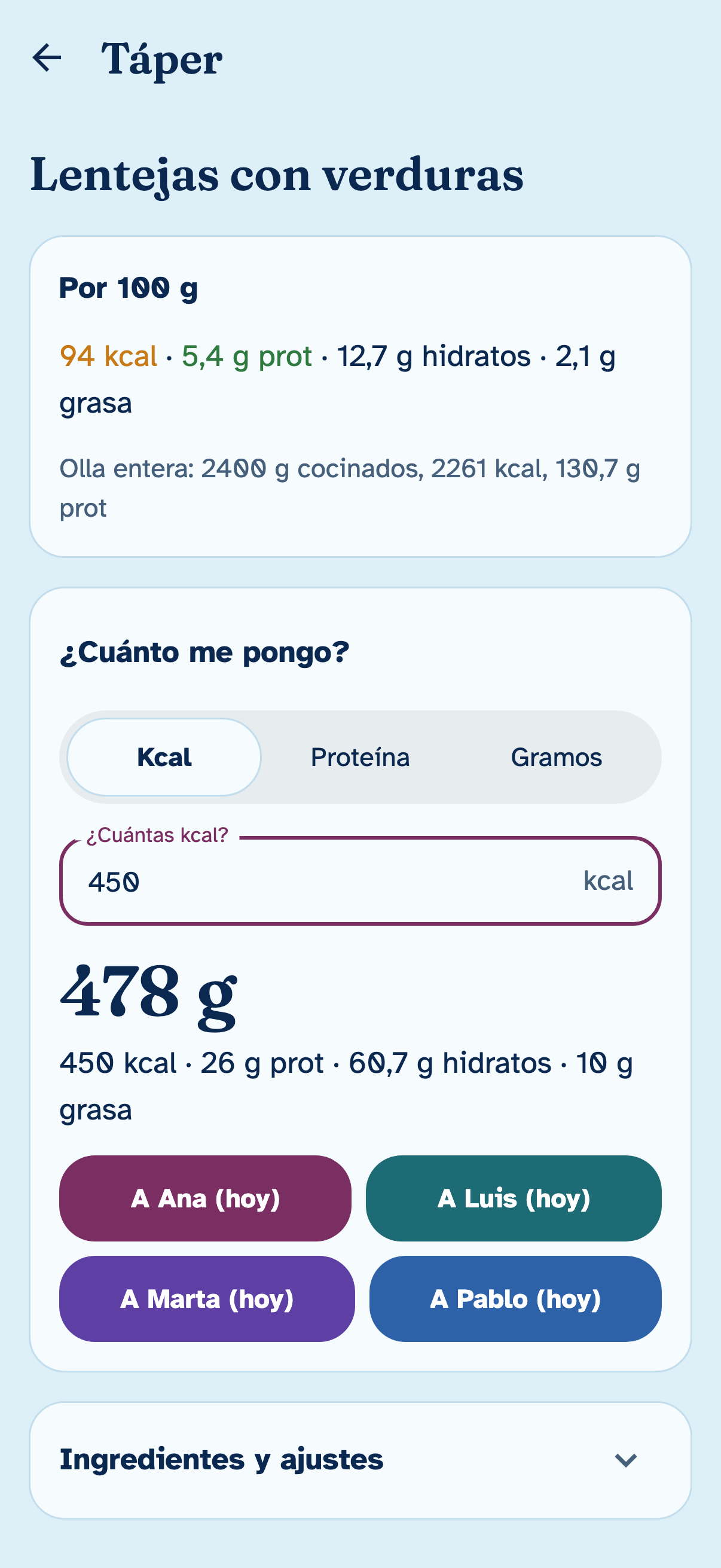
- Batches: you cook once for several days and “How much should I have?” tells you the grams for the calories or protein you want.
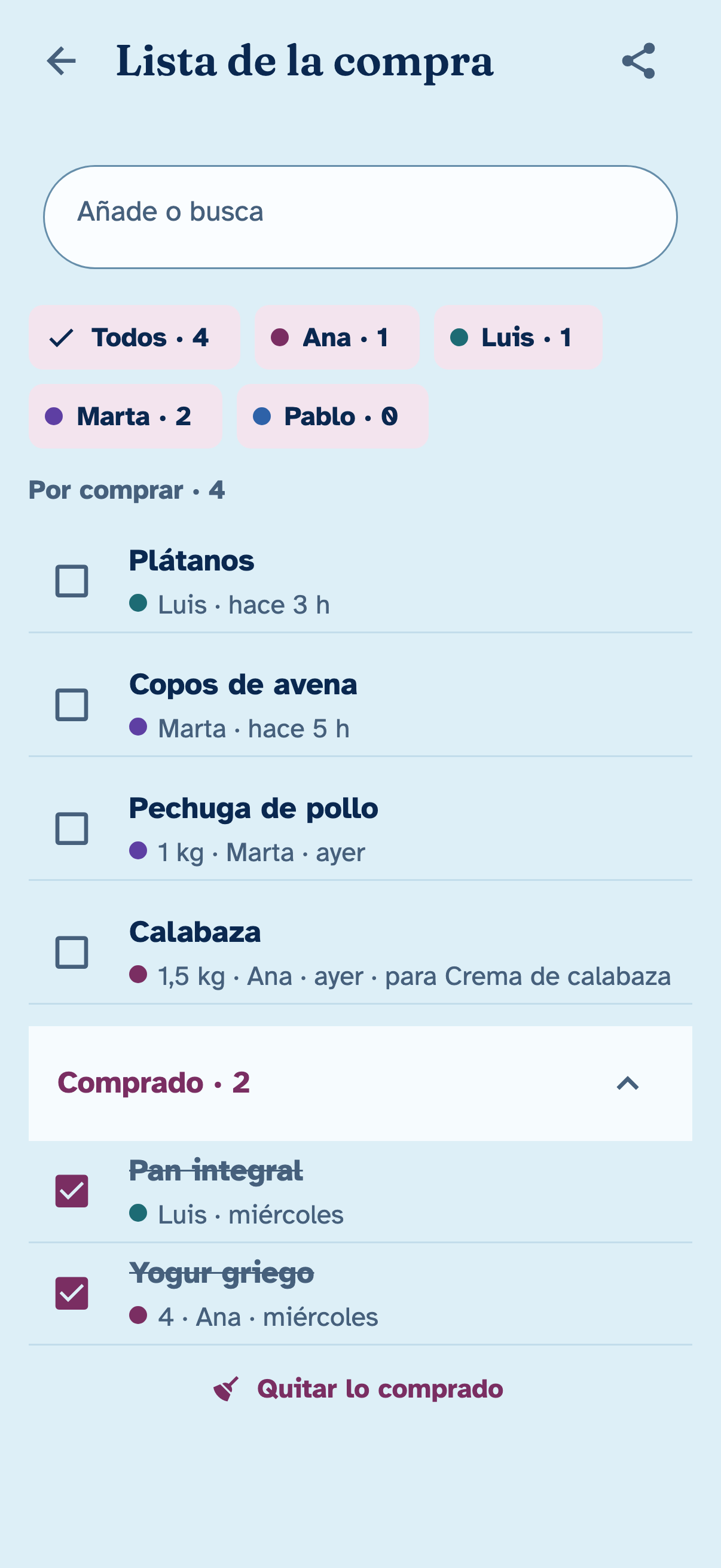
- Shared group recipes and a common shopping list, showing who added each item.
Easy to read, no glasses needed
Made for anyone to use, including people who aren’t comfortable with phones.
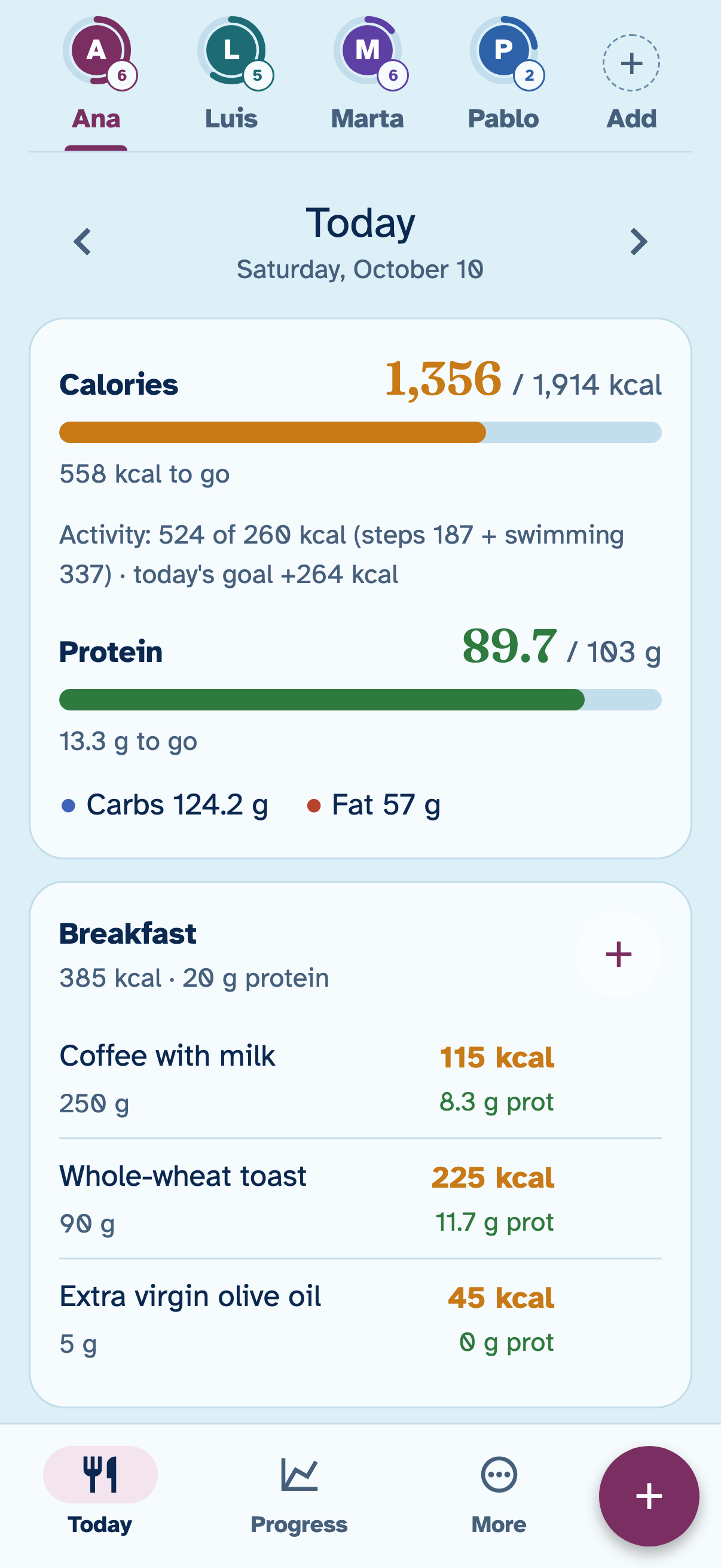
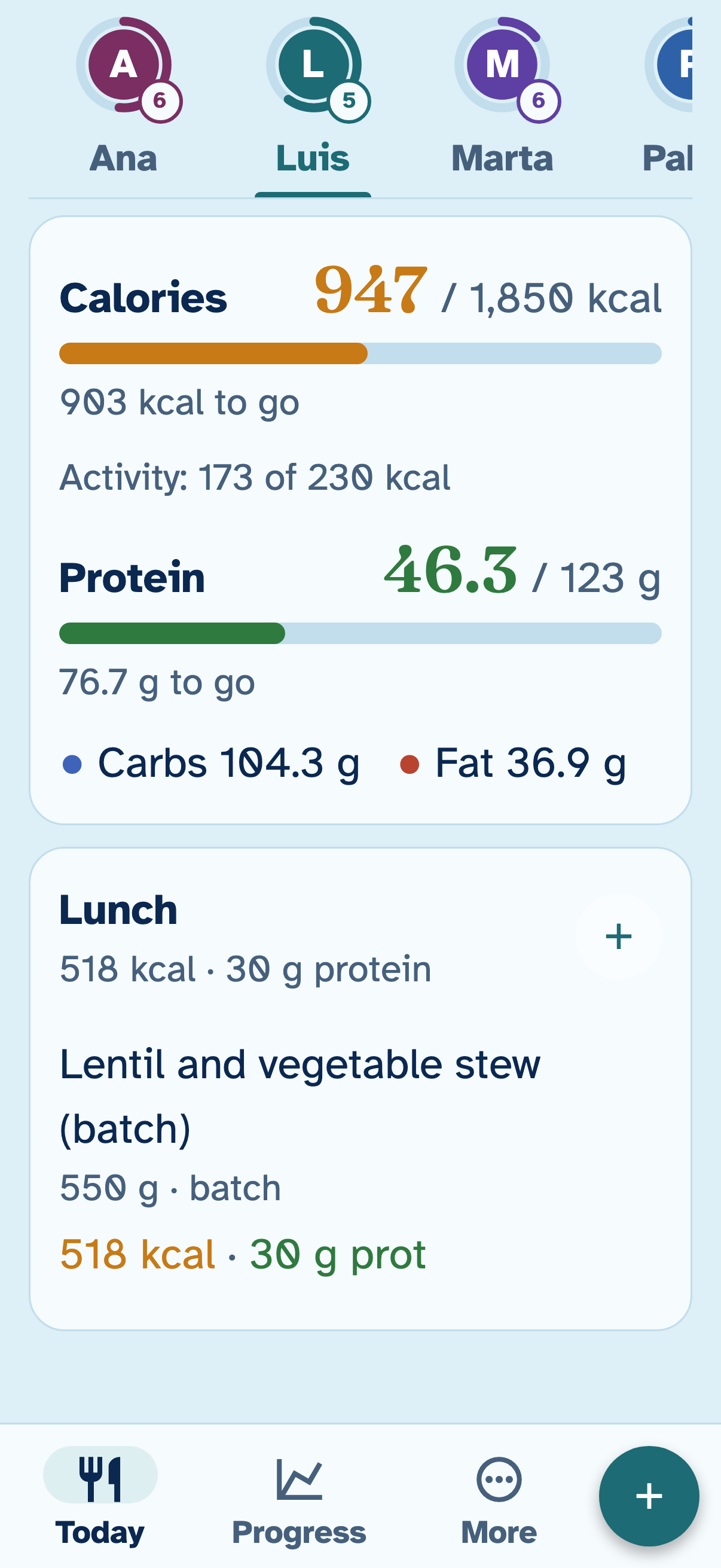
- Large text, about 1.4 times bigger, on the phone of whoever needs it: everyone else still sees normal text.
- High contrast, big buttons and clear wording, no jargon.
- No passwords: you start with your name, and the others join with the group’s code and PIN.
- “Undo” instead of asking “Are you sure?”: whatever you log or delete can be undone with one tap.
More features
-
Recipes
With the calorie or protein goal you want per serving, or pulled from an Instagram, TikTok or YouTube video.
-
Routine and training mode
601 exercises with drawings, your routine and step-by-step workouts, with their rests.
-
Automatic steps and weight
From Apple Health or Health Connect, with your permission. They’re only read.
-
Activities
Treadmill, cycling, swimming, padel or Pilates, with their calories. Walking already counts through your steps.
-
Reminders
To weigh yourself, to log and for your supplements or medication; supplement reminders have a “Done” button right in the notification.
-
Private progress photos
Front, side and back, with their own PIN, to see how you change.
-
Achievements and challenges
Medals and three weekly challenges made for you, with no pop-ups interrupting you.
-
No signal needed
What you log is saved on your phone and uploaded when you’re back online.
Privacy
What you log is health data. This is what the privacy policy says:
- Health data is only stored with your explicit permission, which you give when you start and can withdraw whenever you want.
- There are no ads and no third-party analytics, and data is never sold or handed over to anyone.
- Only with your permission, what you type, dictate or photograph is sent to another company’s AI to do the calculation: always to providers that do not use it to train their models, though some keep it for a limited time under their own rules. Some of these companies are in the United States.
- The database is in the European Union (Ireland) and each group can only see its own data.
- Progress photos are private to each person: they can only be seen on the phones that person unlocks with their photo PIN, and they are not sent to the AI.
- From the app you can delete the group and all its data whenever you want.
Why Evzia exists
Evzia started as an app for my parents, who wanted to keep track of what they ate, the two of them together, without wrestling with their phones.
A lot of how it works comes from them: the large text, so they can read without glasses; the batches, because one of them cooks for both; and “Undo,” so you never have to answer “Are you sure?” at every step. Now more people use it, on their own or in a group, and it’s still made so anyone can understand it.
Alberto López, creator of Evzia
Who’s behind EvziaPlans
Evzia is free. Paid plans give you more AI credits every month, for the whole group.
-
Free
€0
20 AI credits the first month and 10 after that.
-
Basic
€2.99 a month
400 credits a month. Or €29.99 a year.
-
Plus
€4.99 a month
1,200 credits a month. Or €49.99 a year.
-
Max
€9.99 a month
2,500 credits a month. Or €99.99 a year.
-
300-credit pack
€2.99
One-time payment. They don’t expire: they’re used when the month’s credits run out.
Logging something with a sentence or your voice uses 1 credit; with a photo, 2. Anything that doesn’t use AI never uses credits: logging by hand, anything in “Your foods”, viewing and logging your batches and saved recipes, the shopping list, the charts or progress photos.
The month’s credits don’t roll over. Prices in Spain, in euros with VAT included; the App Store shows the price for your country. Plans are purchased inside the app.
See the plans in detailFrequently asked questions
Is it free?
Yes. Everything that doesn’t use AI is free: logging by hand, anything in “Your foods”, viewing and logging your batches and saved recipes, the shopping list, the charts and the progress photos. The AI runs on credits: the Free plan has 20 the first month and 10 after that. If you want more, there are plans from €2.99 a month for the whole group, purchased inside the app. Prices in Spain, with VAT; the App Store shows the price for your country.
What if the AI gets it wrong?
Nothing counts until you confirm it. The AI suggests each food with its grams and values, and you uncheck whatever you didn’t eat or fix the grams. Whatever it estimates, like the weight of an orange, it marks as an estimate. Foods in “Your foods” with real values take priority over generic ones. And if the AI fails, it doesn’t use any credits.
Is there an Android version?
It’s coming soon to Google Play. Meanwhile, you can use Evzia in the browser on your phone or computer, at web.evzia.app, with your name or with your group’s code and PIN. The browser version has no dictation, no Apple Health or Health Connect data, no reminders, no progress photos and no buttons to sign in with Google or Apple, and plans can only be purchased from the phone app.
Is the app in English?
Yes, in US English with metric units (kilograms, centimeters, kilometers). It follows your phone’s language, and you can change it in More → Settings → Appearance → Language. Getting started, Today, the + button and logging food are already in English, and the AI answers in English; some other screens, like Progress, batches, recipes and the shopping list, are still in Spanish while we translate them.
Do I need an account?
No. You start with just your name, with no email or password. If you want, you can save your Google or Apple account to sign back in from another phone. Whoever you invite to your group joins with the group’s code and the PIN you set.
What happens to my data?
The database is in the European Union (Ireland) and each group can only see its own data. There are no ads and no third-party analytics, and data is never sold or handed over to anyone. Only with your permission, what you type, dictate or photograph is sent to another company’s AI to do the calculation: always to providers that do not use it to train their models, though some keep it for a limited time under their own rules, and some of these companies are in the United States. Evzia doesn’t store photos of dishes or labels, or audio. You can delete the group and all its data from the app. All the details are in the privacy policy.
Is it a medical device?
No. Evzia is for logging and following your progress, and its figures are estimates. It doesn’t replace a doctor, dietitian or trainer: if you have a medical condition, are pregnant, take medication or are about to change your diet or exercise a lot, talk to a professional first.
Find your formula
Free to start, with just your name.
Android? Coming soon to Google Play. Meanwhile, try it in your browser.